Download Google Map Extractor (Free Trial)
Google Map Lead Extractor v2.0 is a free-trial download for Windows 10 and 11. The trial has every feature but returns 10 results per search; a paid licence (USD 40/year, or ₹1,999 / 6 months and ₹2,999 / year in India) removes the limit.
File details
| Version | 2.0 |
|---|---|
| File | GoogleMapLeadExtractor.exe |
| Operating system | Windows 10 / Windows 11 |
| Licence | Free trial (10 results/search); paid licence for full results |
| Publisher | MediaByteX, India |
| Mirror | GitHub release v2.0 |
How to install
- Download the .exe above. If SmartScreen shows "Windows protected your PC", click More info → Run anyway.
- Run the installer and open Google Map Lead Extractor from the Start menu.
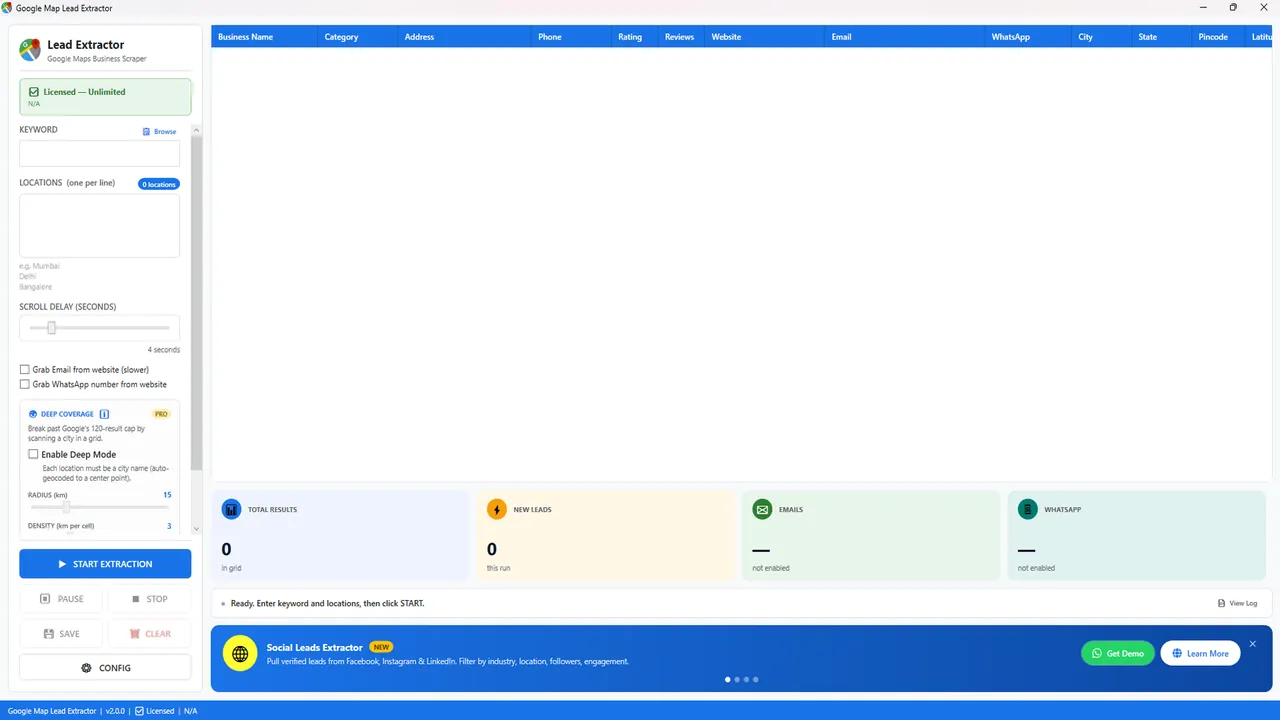
- Type a keyword (e.g. "dentist") and one city per line, then click Start Extraction.
- Click Save to export the results to Excel.
System requirements
| Operating system | Windows 10 or Windows 11 |
|---|---|
| Internet | A stable connection (the app reads Google Maps live) |
| To open exports | Microsoft Excel, LibreOffice Calc or Google Sheets |
| Mac / Linux | Not supported natively; use a Windows virtual machine |
Your first extraction in 5 minutes
- Pick a narrow keyword. "Dental clinic" works better than "doctor"; use the words customers type on Google Maps.
- Add locations, one per line. For big cities, list localities (for example City Centre, Benachity, Bidhannagar) instead of just the city name.
- Choose extras. Tick Grab Email from website and Grab WhatsApp number only if you need them, because they make runs slower.
- Start and watch the counters. The live grid shows total results, new leads, emails and WhatsApp numbers found. Pause or stop at any time without losing rows.
- Save to Excel. Then remove duplicates on the phone column and filter the Website column for blanks to find businesses without a site.
What the trial includes
Every feature except Deep Coverage, with 10 results per search and no expiry. That is enough to test your keywords and cities and to check the Excel output before you buy. See pricing for the paid plans, or read the Hindi guide.
Use the data responsibly
The app collects business information that companies publish on Google Maps and their own websites. Follow India's DPDP Act 2023 and TRAI/DND rules for calls and SMS (GDPR in Europe), and honour opt-out requests. This is general information, not legal advice.
FAQ
Is the download free?
Yes. The trial is free and has every feature, limited to 10 results per search.
Why does Windows show "Windows protected your PC"?
SmartScreen shows this for software from publishers that are new to Microsoft's reputation system. Click More info → Run anyway. Only download from mediabytex.com or the official GitHub release.
Does it work on Mac?
Not natively — use a Windows 10/11 virtual machine.
How do I upgrade to the full version?
Message us on WhatsApp; after payment you receive a licence key to enter in the app. No reinstall needed.
Is the download safe?
Download only from this page or the official GitHub release linked below. You can scan the .exe with Windows Security before running it.
Does the trial expire?
No. The free trial has no expiry; it is limited to 10 results per search.
Where are my Excel files saved?
When you click Save, the app writes an .xlsx file named after your keyword and city, for example Internet_marketing_service_Chandigarh_Leads.xlsx, in the folder you choose.
The extraction stopped or found fewer results. What can I do?
Increase the scroll delay for slower connections, try smaller areas (one locality per line) and make sure you are on the latest version. If it still fails, send us a screenshot on WhatsApp.
Learn more: Google Map extractor software · How to extract data from Google Maps to Excel