Google Map Extractor Software: Export Google Maps Business Leads to Excel
Google Map Lead Extractor is a Windows desktop app by MediaByteX. Type a keyword and a list of cities, click Start, and it collects up to 16 fields from each Google Maps listing — name, phone, website, rating, address, pincode, plus email and WhatsApp from the business website — and saves them to an Excel file. Free trial: 10 results per search. Full version: USD 40/year, or ₹1,999 / 6 months in India.
- No coding or API key
- Runs on your own PC
- No auto-renewal
- WhatsApp support from India
How to extract leads from Google Maps in 3 steps
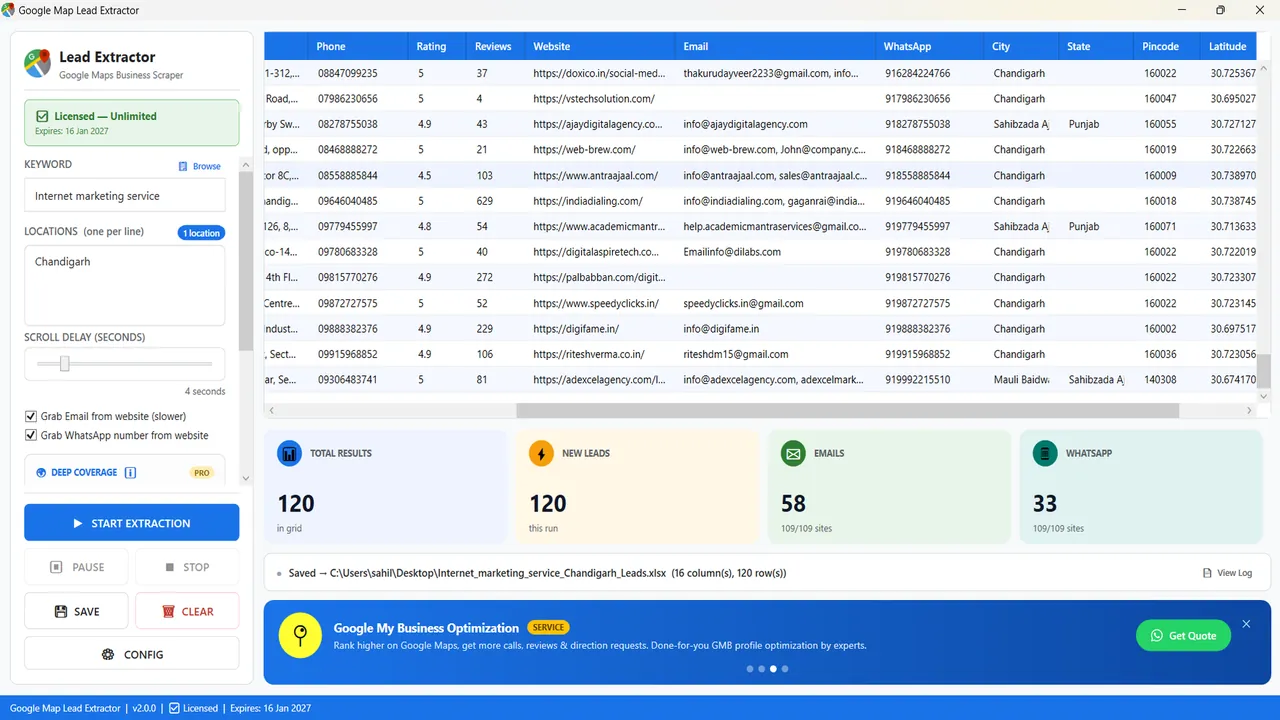
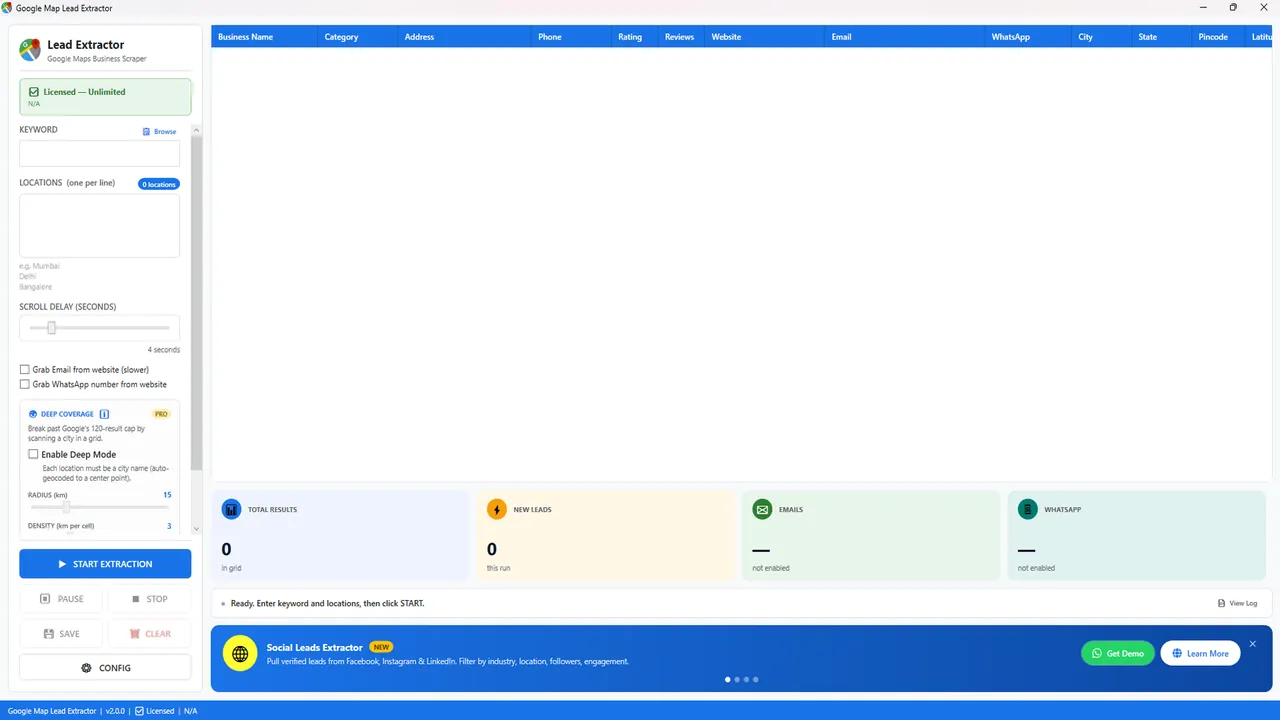
- Enter a keyword and locations. Any search that works on Google Maps — "gym", "CA firm", "furniture manufacturer". Add one city or area per line to run them all in one job.
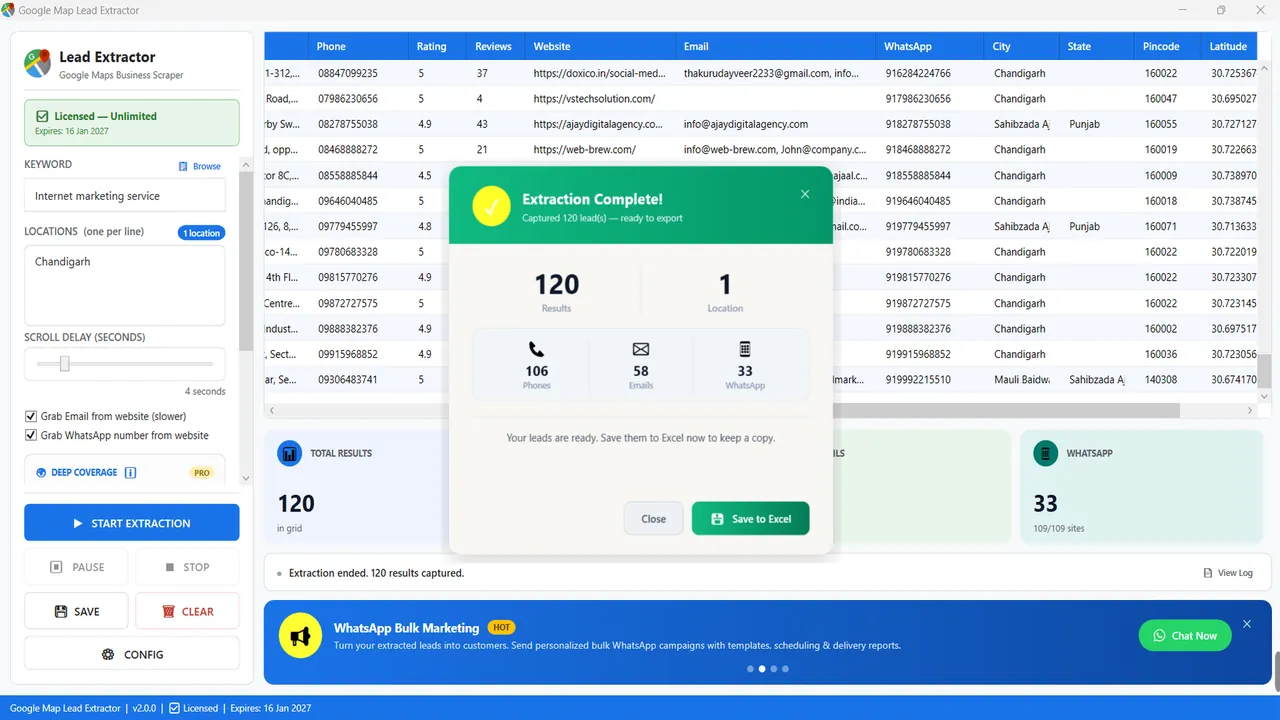
- Click Start Extraction. The app scrolls the Google Maps results for each keyword + location and fills a live grid with counters for leads, emails and WhatsApp numbers. Pause, resume or stop at any time.
- Save to Excel. Each run is saved as an .xlsx file named after the keyword and city (for example
Internet_marketing_service_Chandigarh_Leads.xlsx), ready for your CRM, dialer or WhatsApp tool.
16 data fields from every Google Maps listing
Email and WhatsApp are not shown on Google Maps; the software finds them on the business's own website when they are published there.
| # | Field | Source / note |
|---|---|---|
| 1 | Business name | As shown on the Google Maps listing |
| 2 | Category | Primary Google Maps category |
| 3 | Full address | Street address from the listing |
| 4 | Phone number | Listing phone number |
| 5 | Star rating | 1–5 average rating |
| 6 | Review count | Number of Google reviews |
| 7 | Website URL | Business website, if listed |
| 8 | Email address | Found on the business website (optional, slower) |
| 9 | WhatsApp number | Found on the business website (optional) |
| 10 | City | Parsed from the address |
| 11 | State | Parsed from the address |
| 12 | Pincode / postcode | Parsed from the address |
| 13 | Latitude | GPS coordinate |
| 14 | Longitude | GPS coordinate |
| 15 | Working hours | Opening hours, if listed |
| 16 | Google Maps URL | Direct link to the listing |
Features of the Google Maps data extractor
Keyword + multi-city batches
One keyword, dozens of locations in a single job — useful for overnight runs.
Email & WhatsApp grabber
Optional website visit to find published emails and WhatsApp numbers.
Deep Coverage Paid
Scans a city in a grid (radius and density settings) to go past Google Maps' ~120-result view.
Scroll-delay control
Slow down or speed up extraction for stable, reliable runs.
Live grid & counters
Total results, new leads, emails and WhatsApp found — updated as it runs.
Pause, resume, stop
Full control over long jobs without losing collected rows.
Excel export
Clean .xlsx with one row per business and smart file names.
Free updates
When Google Maps changes its layout, licence holders get updated builds at no extra cost.
Screenshots
Demo video
Who uses a Google Maps lead extractor?
Agencies
Find local businesses with no website or low ratings and offer web design, SEO or ads.
B2B sales teams
Build territory lists of distributors, clinics, retailers or manufacturers by city.
Freelancers & recruiters
Produce niche lead lists or employer lists for clients in minutes.
Exporters & wholesalers
Find dealers and stockists in new cities or countries.
Desktop Google Map extractor vs cloud Google Maps scrapers
| Google Map Lead Extractor | Cloud scrapers (Outscraper, Apify, PhantomBuster, Scrap.io) | |
|---|---|---|
| Pricing model | Fixed: USD 40/year; India ₹1,999/6 mo or ₹2,999/yr | Monthly plans, credits or per-1,000-record billing (check each vendor) |
| Where it runs | Your Windows PC | Vendor cloud, any browser |
| Setup | Install, type keyword + city, click Start | Web app; some features need API or workflow setup |
| Export | Excel (.xlsx) | CSV / JSON / Excel / API |
| Email & WhatsApp from websites | Built in | Often a separate enrichment step |
| API, scheduling, Mac | Not available | Usually available |
| Support | WhatsApp / phone, India time zone | Email, chat or tickets |
Choose a cloud tool if you need an API, scheduled jobs or very large automated volumes. Choose this app for steady lead lists on a fixed budget. Detailed comparisons: Outscraper alternative · Best Google Maps scrapers 2026.
Google Map extractor price
1 year — international
- Unlimited extraction*
- Free updates for 12 months
- No auto-renewal
India — 6 months / 1 year
- Unlimited extraction*
- GST invoice
- WhatsApp support
*No software cap on paid plans; you get as many results as Google Maps shows for each keyword and location. Full details: pricing page.
System requirements & download
| Operating system | Windows 10 or Windows 11 (64-bit recommended) |
|---|---|
| Current version | 2.0 |
| Internet | Required while extracting |
| To open exports | Microsoft Excel, LibreOffice Calc or Google Sheets |
| Download | Free trial download page · GitHub release |
Is it legal to extract data from Google Maps?
The software collects business information that companies publish on Google Maps and on their own websites. Laws and platform terms differ by country, so use the data responsibly: follow India's DPDP Act 2023 and TRAI/DND rules for calls and SMS, GDPR in Europe and local anti-spam laws, honour opt-out requests and don't resell personal data. This is general information, not legal advice.
Frequently asked questions
What is the best Google Map extractor software for Windows?
If you want a desktop app with a fixed yearly price and Excel export, Google Map Lead Extractor is built for exactly that: it runs on Windows 10/11, exports up to 16 fields per listing and costs USD 40/year (₹1,999 for 6 months in India). If you need a cloud API or Mac support, a cloud tool such as Outscraper or Apify fits better — see our 2026 comparison.
How do I extract leads from Google Maps to Excel?
Type a keyword (for example "dentist"), add one city per line and click Start Extraction. The software collects each listing and saves an .xlsx file named after the keyword and city. A step-by-step guide with all three methods is in How to extract data from Google Maps to Excel.
Is there a free version?
Yes. The free trial has every feature but returns 10 results per search. A paid licence removes the limit.
How much does Google Map Lead Extractor cost?
USD 40 for one year internationally. In India: ₹1,999 for 6 months or ₹2,999 for 1 year. Each licence is a one-time payment for its term — there is no auto-renewal. See pricing.
Does it extract emails and WhatsApp numbers?
Phone numbers come from the Google Maps listing. Emails and WhatsApp numbers are not shown on Google Maps, so the software can visit each business website and pick up any published email or WhatsApp number. This is optional because it makes runs slower.
Is there a limit on results?
Google Maps itself shows roughly 120 results per search. Paid plans have no extra cap from the software, and the Deep Coverage option (paid) scans a city in a grid to go beyond that 120-result view.
Does it work outside India?
Yes, for any city or country that appears on Google Maps. Pincode parsing is tuned for Indian addresses.
Will Google block me?
The tool uses an adjustable scroll delay and does not sign in to any Google account, which is designed to reduce the risk of temporary blocks. No scraper can guarantee you will never see a captcha or rate limit; if that happens, increase the delay and run smaller batches.
Does it work on Mac or Linux?
Not natively. It needs Windows 10 or 11; a Windows virtual machine on a Mac also works.
Do I need coding skills or an API key?
No. It is a normal Windows program — install it, type a keyword and city, click Start.
Who makes Google Map Lead Extractor?
The software is developed and supported in-house by MediaByteX, a software and digital marketing company from India serving customers worldwide. Questions go straight to the developers on WhatsApp +91 96475 04140 or info@mediabytex.com. Source page and releases: GitHub.
Changelog
- v2.0 (2026) — new interface with live KPI counters, multi-location batches, email and WhatsApp grabber, Deep Coverage grid scan, scroll-delay control, smart Excel file names.
- v1.x — first public release: keyword + city extraction to Excel.
Last updated: 22 October 2026.
Related guides
- How to extract data from Google Maps to Excel (2026 guide)
- Best Google Maps scrapers in 2026, compared
- A simple Outscraper alternative
- Google Map se data kaise nikale (Hindi)
- Google Map Extractor price & plans
- Leads Checker — clean extracted lists before outreach
- WhatsApp Campaign Manager — follow up with your leads