Email Extractor for Google Maps Business Leads
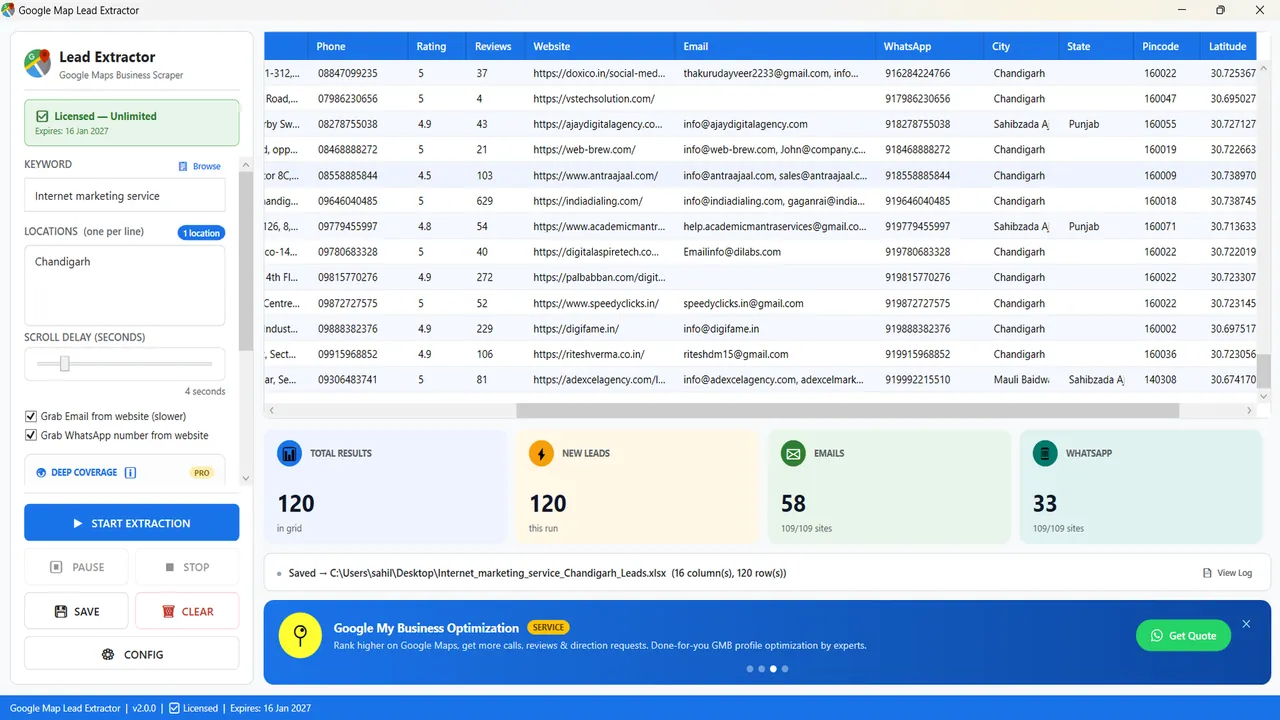
Google Maps listings do not contain an email field. Google Map Lead Extractor can still export one: an optional pass opens the website on the listing (if any) and saves addresses the business published there. It is slower than a Maps-only run, it is included in the Windows licence, and it is not a separate email-finder product. No website, or no address on the website, means a blank cell — not a guessed info@.
Why the Maps card is not enough
People search “Google Maps email extractor” because they want a mailbox next to the phone. Google does not give that mailbox on the card. The Places API does not give it either. Every honest Maps-to-Excel tool that claims email is doing a second job: reading the company website, buying an enrichment API, or matching the domain against a people database.
This software does the first of those jobs, on your PC. It uses the website URL already sitting in the listing. It does not subscribe to Hunter, Apollo or similar, and it does not score deliverability. If you need verified decision-maker emails, that is a different category of product; use one after you have domains, or skip email and call the listing phone.
What “optional, slower” means in practice
Leave Grab Email from website off when you only need name, phone, rating, address and the Maps link. Those fields come from the listing and the run stays at Maps speed. Turn it on when a mailbox would change the next step (a quote, a catalogue, a “you have no website” pitch with a CC). The app then spends time on each site. Long multi-city jobs should be planned overnight if both email and WhatsApp are ticked.
- Download the Windows 10/11 trial.
- Keyword + locations (one city or locality per line).
- Tick Grab Email from website.
- Start. The email counter will trail the lead counter.
- Save the
.xlsx. Filter the Email column for blanks if you want a calling-only pile, or for filled cells if you want a mail-merge pile.
All 16 export fields
Email is one column. The rest of the listing still exports even when the mailbox is empty.
| # | Field | Source / note |
|---|---|---|
| 1 | Business name | As shown on the Google Maps listing |
| 2 | Category | Primary Google Maps category |
| 3 | Full address | Street address from the listing |
| 4 | Phone number | Listing phone number |
| 5 | Star rating | 1–5 average rating |
| 6 | Review count | Number of Google reviews |
| 7 | Website URL | Business website, if listed |
| 8 | Email address | Found on the business website (optional, slower) |
| 9 | WhatsApp number | Found on the business website (optional) |
| 10 | City | Parsed from the address |
| 11 | State | Parsed from the address |
| 12 | Pincode / postcode | Parsed from the address |
| 13 | Latitude | GPS coordinate |
| 14 | Longitude | GPS coordinate |
| 15 | Working hours | Opening hours, if listed |
| 16 | Google Maps URL | Direct link to the listing |
What you should not expect
- Not 100% coverage. A large share of Indian Maps listings have no site, or a Facebook page, or a site with a form and no mailto.
- Not people-level contacts. You get whatever the company printed — often a generic inbox, sometimes a founder’s Gmail, never a hidden director@ that is not on the page.
- Not SMTP verification. A saved address can still bounce. Verify if your sender reputation matters.
- Not a cloud API. Windows desktop, your machine, Excel out. No Mac/Linux native, no auto-renewal, no per-record enrichment invoice.
Email grabber vs dedicated finders
| Google Map Lead Extractor | Typical email-finder SaaS | |
|---|---|---|
| Starting point | Google Maps keyword + city | Domain, company name or LinkedIn-style person |
| Email source | Published on the business website | Pattern matching, crawls, paid databases |
| You also get | Phone, rating, PIN, Maps URL, 16 fields | Usually mailbox + confidence, not a Maps row |
| Billing | Fixed licence (USD 40/yr; India ₹2,999/yr) | Credits or seats — check that vendor |
| Best when | Local business lists from Maps | Named contacts at known companies |
Disclosure: Google Map Lead Extractor is our product. Finder tools are a different job; we do not claim to replace them.
After the sheet is saved
Remove duplicates on phone and on email. Drop obvious no-reply and role addresses if your sequence is meant for a human. For India-specific pricing, GST and pincode parsing, use the India page. Hindi: Google Map se data kaise nikale.
Maker: MediaByteX, Sentrum Mall, Asansol 713305. Support +91 96475 04140 · info@mediabytex.com. Trial: 10 results/search, no expiry.
FAQ
Does Google Maps show the business email on the listing?
No. The Maps card has no email field. Phone and website can appear; email does not. Google Map Lead Extractor fills the email column only when it finds an address published on the business website.
Is this a standalone email-extractor product?
No. It is an optional, slower pass inside Google Map Lead Extractor for Windows. One licence covers Maps fields plus this website pass. There is no per-inbox fee.
Where on the site does it look?
It visits the website URL from the listing and looks for published addresses (for example mailto links and visible contact/footer emails). It does not solve CAPTCHAs, does not log into webmail, and does not buy data from an email-finder database.
Why do so many rows have a blank email?
Because many listings have no website, a website with only a form, or an address hidden in an image. Blank is the correct result. Do not expect Hunter-style people-emails for staff who are not printed on the site.
Is email grabbing included in the free trial?
Yes, with 10 results per search and no trial expiry. Deep Coverage is paid-only; the email option is not.
Can it find personal Gmail addresses?
Only if that Gmail (or Yahoo, Outlook, etc.) is written on the website. Indian SMBs often publish a personal mailbox on the Contact page; the software will save it when it is visible. It will not invent a pattern like info@domain.com.
Is it legal to email these addresses?
They are addresses the business chose to publish. Sending still has to follow the DPDP Act 2023 in India, GDPR where it applies, and anti-spam rules. Honour unsubscribe requests. This is not legal advice.