WhatsApp Number Extractor for Google Maps Leads
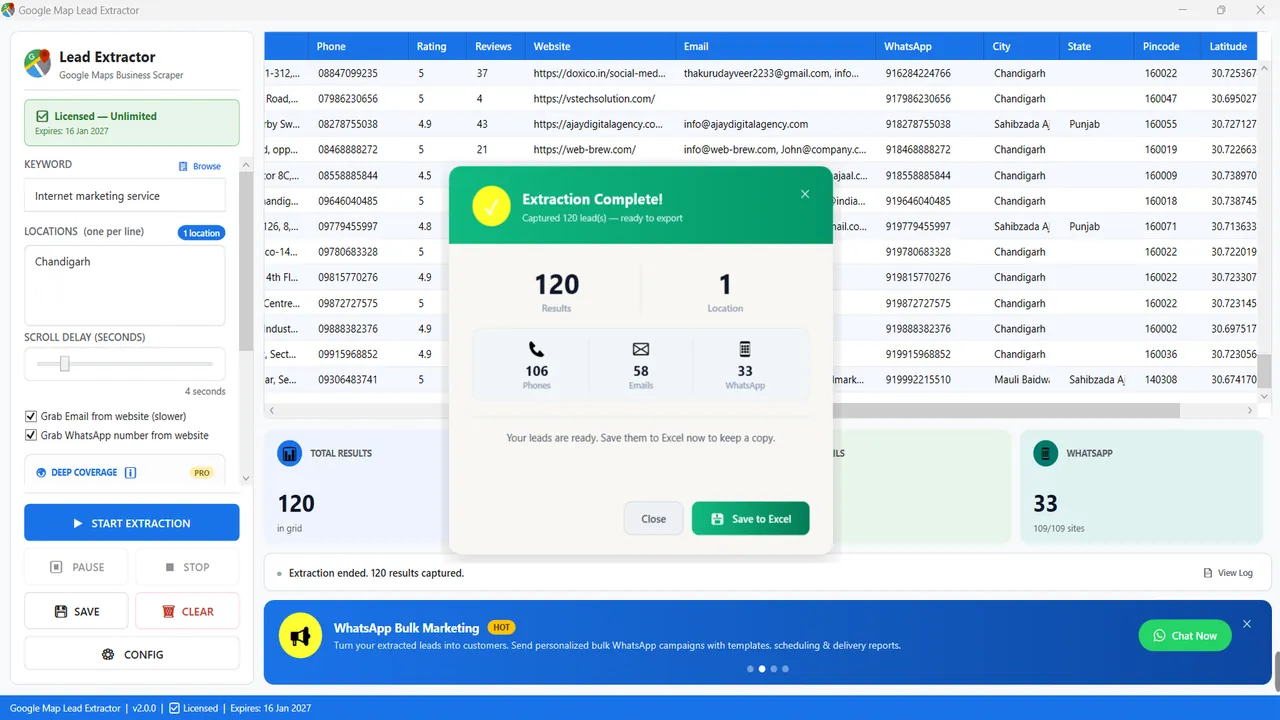
Google Maps does not list a WhatsApp number on the business card. Google Map Lead Extractor can still fill a WhatsApp column: after it saves the listing, an optional pass visits the business website and copies WhatsApp numbers the company published there (for example a wa.me link or a click-to-chat button). It is the same Windows app, not a second product. The pass is slower. If the site has no number, the cell stays empty.
What Google Maps gives you, and what it does not
A Maps listing is a public business card: name, category, address, a phone that may be a landline or a mobile, a website if the owner added one, hours, rating, reviews, coordinates. Sales teams in India often assume the phone is a WhatsApp number. Sometimes it is. Often it is a reception desk, a virtual number, or a line that never accepted a WhatsApp invite. Maps itself does not tell you.
The WhatsApp grabber is the software’s attempt to use a second public source: the site the listing already points to. It does not log into WhatsApp, does not scrape the WhatsApp application, and does not read Google’s in-Maps chat. If you need that distinction for a client or a compliance review, this is it.
What the optional pass looks for
- Click-to-chat /
wa.me/api.whatsapp.com/sendlinks on the pages it fetches. - Visible “WhatsApp us” numbers next to those widgets, when the markup makes the number obvious.
- Nothing behind a login, a CAPTCHA wall, or an image-only visiting card with no text number.
Hit rates vary by niche. A clinic chain that put WhatsApp on every landing page will fill many cells. A kirana listing with no website will fill none. Treat the column as a bonus on top of the listing phone, not as a promise that every row is chat-ready.
How to turn it on
- Install Google Map Lead Extractor on Windows 10/11.
- Enter a keyword and one location per line, the same as any other run.
- Tick Grab WhatsApp number (and email only if you also need that slower pass).
- Start extraction. Watch the WhatsApp counter; it will lag behind the lead counter because websites load after the Maps row exists.
- Save to Excel. Clean duplicates on the phone column. Keep rows with a WhatsApp value in a separate filter if your outreach is chat-first.
WhatsApp column vs the other 15 fields
The grabber does not replace the listing. You still export the full row. WhatsApp is field 9 of 16:
| # | Field | Source / note |
|---|---|---|
| 1 | Business name | As shown on the Google Maps listing |
| 2 | Category | Primary Google Maps category |
| 3 | Full address | Street address from the listing |
| 4 | Phone number | Listing phone number |
| 5 | Star rating | 1–5 average rating |
| 6 | Review count | Number of Google reviews |
| 7 | Website URL | Business website, if listed |
| 8 | Email address | Found on the business website (optional, slower) |
| 9 | WhatsApp number | Found on the business website (optional) |
| 10 | City | Parsed from the address |
| 11 | State | Parsed from the address |
| 12 | Pincode / postcode | Parsed from the address |
| 13 | Latitude | GPS coordinate |
| 14 | Longitude | GPS coordinate |
| 15 | Working hours | Opening hours, if listed |
| 16 | Google Maps URL | Direct link to the listing |
Honest limits
- Not a separate WhatsApp product. Same v2.0 Windows licence as the rest of Google Map Lead Extractor.
- Website required. No site listed on Maps → no site to visit → empty WhatsApp cell.
- Published numbers only. A number that exists only in the owner’s personal chat is invisible to this software.
- Slower jobs. Leave the option off when you only need name, phone, rating and address.
- Windows only, no API. The PC runs the visit. There is no cloud queue and no Mac build.
- Formatting. Indian numbers on sites appear with spaces,
+91or a leading zero. Plan a cleanup step (many teams normalise to91XXXXXXXXXXin Excel) before you import a sender.
When to skip the grabber
Skip it
You only need phones and ratings for a calling day, or you are testing keywords. Maps-only is faster.
Turn it on
Your first touch is WhatsApp, and you would rather message a number the business advertised for chat than guess from the listing phone.
India notes
For rupee pricing, GST and pincode columns see Google Map Lead Extractor in India. Hindi walkthrough: Google Map se data kaise nikale. Emails use the same optional website pass — email extractor.
Price of the software (the only price; WhatsApp is not billed per number): USD 40/year internationally, or in India ₹1,999 / 6 months and ₹2,999 / 1 year. No auto-renewal. Support: +91 96475 04140 · info@mediabytex.com.
FAQ
Does Google Maps show a WhatsApp number on the listing?
No. The Maps card can show a calling number, a website and a chat button for Google’s own messaging. It does not publish a WhatsApp number as a field you can export. Google Map Lead Extractor only saves a WhatsApp number when the business has printed one on its own website.
Is this a separate product from Google Map Lead Extractor?
No. WhatsApp grabbing is an optional checkbox inside the same Windows app. There is no second licence, no per-number fee and no extra download. See the main product page.
Why is the option slower?
After the Maps listing is collected, the app opens the business website (when one is listed) and looks for published WhatsApp numbers. That extra HTTP work is why a run with the grabber on takes longer than a Maps-only run.
What if the business has no website?
Then there is nothing to visit. The WhatsApp column stays empty. You still get the listing phone, which in India is often a mobile you can start a WhatsApp chat with — but that is the listing phone, not a number the software “found on WhatsApp”.
Will every website yield a number?
No. Many sites have no WhatsApp widget, no wa.me link and no “chat on WhatsApp” footer. The software does not guess, scrape WhatsApp itself, or read Google Business messages. Empty cells are honest empties.
Can I use the list for bulk WhatsApp campaigns?
Only if you follow Indian law and WhatsApp’s own rules. Published business numbers are not a licence to spam. Honour opt-outs. This page is not legal advice. If you already have a sender, WhatsApp Campaign Manager is a separate MediaByteX tool for follow-up — it does not replace consent.
Is the grabber in the free trial?
Yes. The trial includes the option, limited to 10 results per search, with no expiry. Deep Coverage is the paid-only extra, not WhatsApp grabbing.
Free trial download (10 results/search) · Pricing · Google Map Lead Extractor