Get More Than 120 Results from Google Maps with Deep Coverage
One Google Maps search shows roughly 120 places, however long you scroll. Deep Coverage in Google Map Lead Extractor breaks the city into a grid, searches each cell, removes duplicates and saves the combined list to Excel. It runs on Windows, needs no Google API key, and is included in the paid plans only.
The 120-result wall
Search "restaurants in Kolkata" or "dentist in London" on Google Maps and the list ends long before the city does. Maps only lists a limited set for the area in view - in practice about 120 places. Any scraper that runs one search per city inherits that ceiling, so a big-city export looks complete but is not.
The usual workaround is manual: search locality by locality, pincode by pincode, and merge the sheets. Deep Coverage automates that.
How the grid scan works
- Enter the keyword (for example hardware store) and the city.
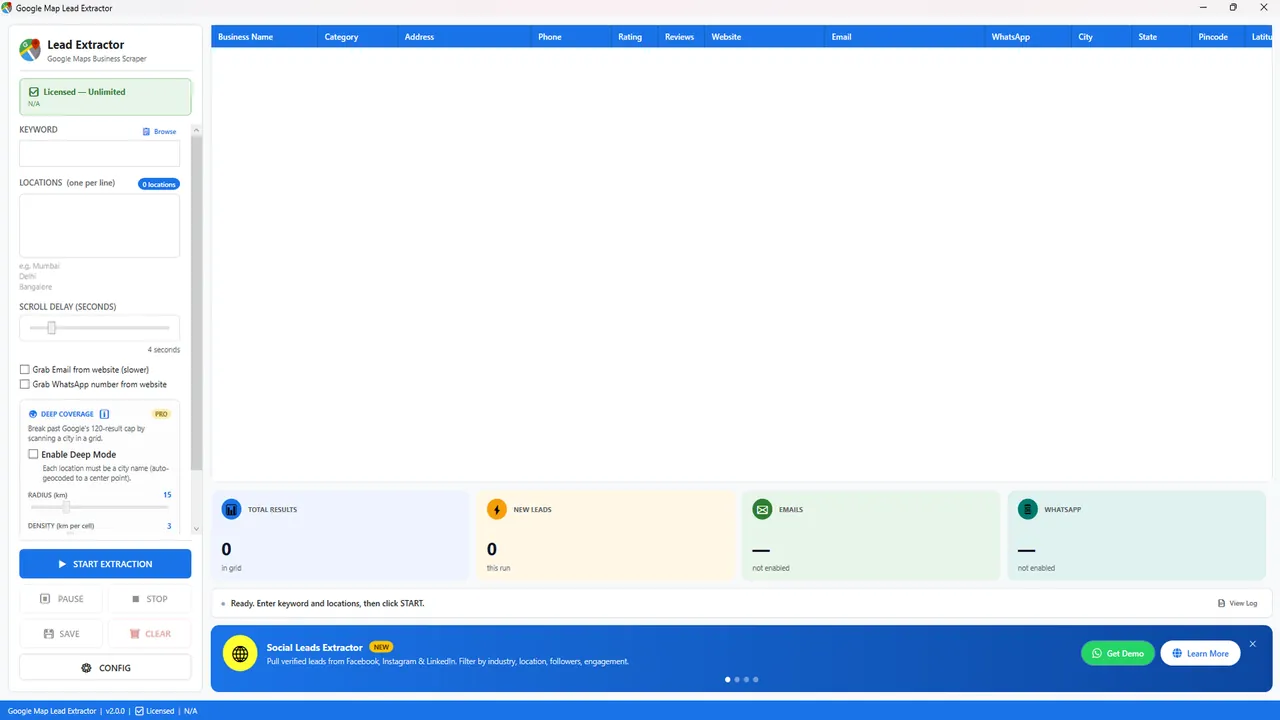
- Turn on Deep Coverage and pick a radius and density. Denser grid = more cells = more results and more time.
- The app runs the keyword on each grid cell, like a person panning the map.
- Duplicate listings found in neighbouring cells are removed.
- Save one
.xlsxwith all 16 fields - name, phone, website, rating, address, Maps link and more. Add the optional email and WhatsApp passes if you need them.
Without an API, without code
The Google Places API is one way to pull place data, but it needs a Cloud project, billing and code, and is metered per request. Google Map Lead Extractor reads what Maps shows on your PC instead: no API key, no developer, a fixed licence. The trade-off: Windows 10/11 only, no Mac or Linux build, and the PC must stay on while a job runs.
Normal search vs Deep Coverage
| Normal search | Deep Coverage | |
|---|---|---|
| Results per keyword + location | What one Maps search shows (~120) | Combined from every grid cell |
| Best for | Small towns, one locality, quick lists | Large cities, broad categories |
| Speed | Fast | Slower - one search per cell |
| Duplicates | n/a | Removed before export |
| Plan | Free trial and paid | Paid only |
When you do not need it
If your keyword returns fewer than about 100 places for a town, the normal search already has them all - Deep Coverage only adds time. Use it for metros, wide categories, or when the first export stops at roughly 120 rows. Multi-location batches (one locality per line) are another way to go wider and work on every plan.
India buyers: rupee pricing and GST invoice are on the India page. Maker: MediaByteX, Sentrum Mall, Asansol 713305. Support +91 96475 04140 - info@mediabytex.com (Mon-Sat 10:00-19:00 IST).
FAQ
Why does Google Maps stop at about 120 results?
A single Google Maps search only lists a limited set of places for the area on screen - in practice roughly 120. Scrolling further does not load more. This is how Maps behaves, not a limit added by the software.
How does Deep Coverage get more than 120 results?
It splits the city into a grid of smaller areas (you set radius and density) and runs the same keyword on each cell. Each cell returns its own list, and duplicates are removed before the Excel export. You get the businesses one wide search would have hidden.
Do I need a Google API key for this?
No. Google Map Lead Extractor is a Windows desktop app with no coding and no Places API key. You type a keyword and locations; it reads what Google Maps shows. There is no cloud API from us either.
Is Deep Coverage in the free trial?
No. Deep Coverage is paid-only. The free trial gives 10 results per search with no expiry, so you can test fields and the Excel output first. See pricing.
Will it find every business in a city?
No tool can promise that. Deep Coverage returns what Google Maps lists across the grid cells. Businesses without a Maps listing, or in a category you did not search, will not appear. A denser grid finds more but takes longer.
How long does a Deep Coverage run take?
Longer than a normal search, because every grid cell is a separate search. A small town may finish quickly; a large metro with a dense grid plus email and WhatsApp passes is better run overnight. Your PC has to stay on.